 cRyPtO sMaRt
Four entry styles
Retest waits for a return to the level; Accept follows acceptance; Sweep looks for a failed break; All enables the three modes.
Start with the watched high and low instead of chasing an isolated candle. Choose Retest, Accept, Sweep or All; the selected rules decide which setups qualify.
Rules illustration · Not a TradingView screenshot or performance record
TradingView indicator · Breakout structure
Wait for structure. Confirm the retest.
Give every breakout a reference. Falcon follows the active range, filters the setup and marks entry, stop and target levels on the chart you are studying.
Personal digital licence · Price confirmed before payment
Explore the setup, step by step ↓A considered choice
For traders who already understand stops and position sizing and want a repeatable way to review breakouts, retests and failed breaks.
Retest waits for a return to the level; Accept follows acceptance; Sweep looks for a failed break; All enables the three modes.
Higher-timeframe trend, setup quality, stop distance and estimated costs can filter setups.
Optional range levels, live level bands, historical signal stamps and a dashboard keep the information together.
Create a Buy, Sell or Any signal alert in TradingView after choosing your chart and settings.
The process
Start with the watched high and low instead of chasing an isolated candle.
Choose Retest, Accept, Sweep or All; the selected rules decide which setups qualify.
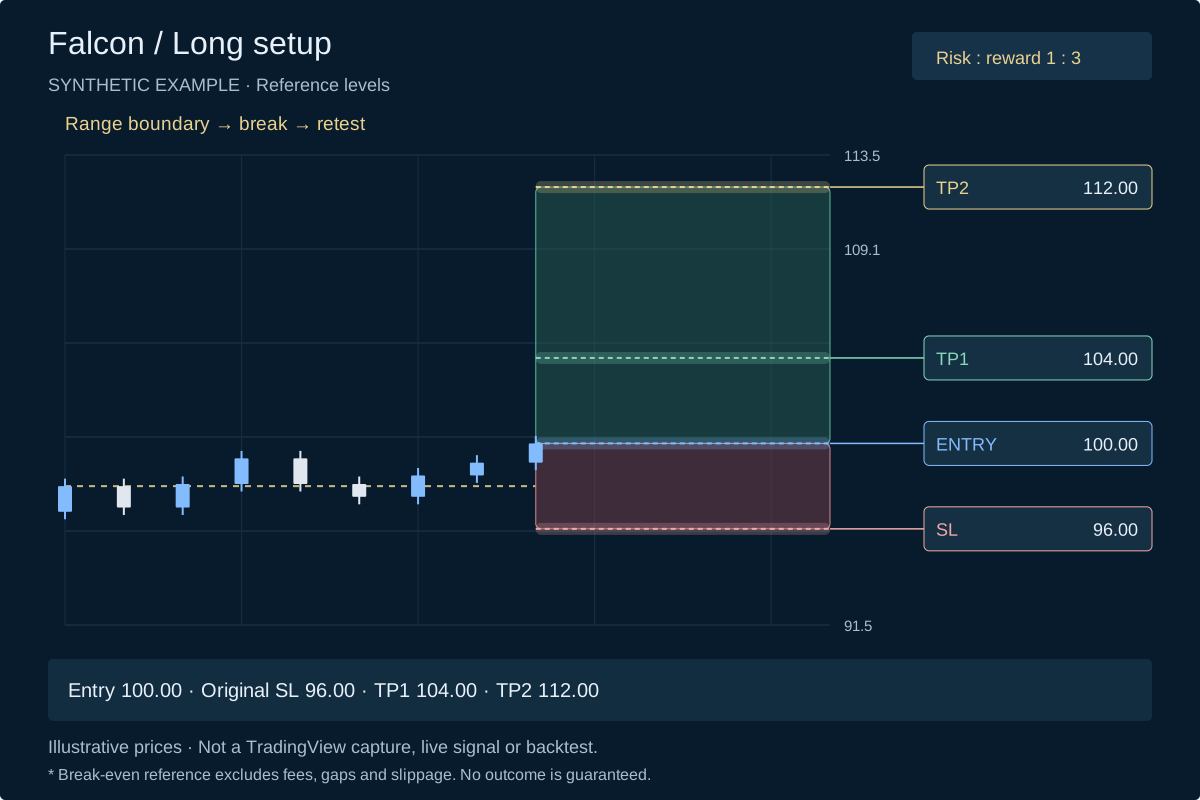
Read the entry, stop and targets together, then make your own execution decision.
Understand the trade levels
An educational sequence informed by the supplied script. Play it or choose a step.
After TP1: simulated stop → 100.00. Execution costs still apply.
Open full-size trade chart ↗Step 1 of 3
Review the range and retest context.
Motion starts only when you press Play.
Explore the rules
The diagrams use synthetic candles to explain a workflow; they do not show actual trades or tested performance.
Guided explanation
Start with the watched high and low instead of chasing an isolated candle.
Your chart, your settings
Defaults describe the supplied source, not a recommendation for a particular market.
Field preview based on the supplied script. Values depend on the chart and settings; no example performance numbers are invented here.
Signal behaviour
Checked against the supplied Falcon Pine v6 source.
The engine evaluates the selected range entry style only when the chart bar is confirmed.
The current candle and calculations using its changing prices can move. Treat them as developing context rather than a newly confirmed entry.
Both supplied scripts request previous-bar higher-timeframe close/EMA values. The chart history, selected timeframe and feed still matter.
Historical OHLC bars do not reveal the full sequence of prices within a candle. Dashboard results are simulated and are not evidence of broker fills.
Your purchase
Readable Pine v6 source; the supplied release is v3.3.
12-page guide covering installation, inputs and signal interpretation.
Use the delivered source on your own TradingView account; no redistribution.
After checkout
Use your purchase email; payment is verified on the server.
Files unlock after captured payment is confirmed. Keep the confirmation page available.
Download your source and guide, then follow the TradingView setup instructions.
Download link: 3 days, with free re-issue through Recover access.
Digital educational products. No physical delivery or guaranteed trading outcome. Purchase terms · Disclaimer
Choose the workflow
| Focus | Falcon | Oracle |
|---|---|---|
| Core setup | Range breakout, retest or sweep | Trend pullback and reclaim |
| Main reference | Watched range high / low | Value and trend EMAs |
| Included | Pine v6 source + 12-page guide | Pine v6 source + 14-page guide |
| Execution | You decide and place trades; neither product is an exchange-connected bot. | |
Supplied release
The supplied file identifies itself as Falcon v3.3. Entry styles, range display and trade-level bands are present in this release; no verified release date was supplied.
Before you decide
A TradingView account with access to Pine scripts. Available alert counts, notification channels and historical data depend on your TradingView plan.
No. It runs on the chart you open in TradingView. It does not connect to your exchange or execute orders.
The supplied source gates entry decisions on confirmed chart bars. Higher-timeframe calculations and data history can affect behaviour; the “non-repainting” claim has not been independently certified here.
Historical candles do not contain the full sequence of intrabar prices. Data revisions, settings, chart history and execution can change the result. Dashboard statistics are simulated, not a broker account record.
TradingView saves the script, inputs, symbol and timeframe when you create an alert. Delete and recreate the alert for relevant changes to take effect.
Once the server confirms captured payment, your licensed files become available. The ZIP download link lasts 3 days and can be re-issued through Recover access.
Personal use on your own account and devices. Resale or redistribution is not included; see the existing store terms for the purchase conditions.
A little guidance
Three quick choices. A clear reason for the recommendation.
Ready when you are